Everyday life · Independent build
Interlude
I built a personal learning app to replace some doomscrolling with five-minute lessons in the subjects I care about.
- My role
- Product direction & prototyping
- Designed for
- A learner using short reading and listening sessions
- Current status
- Private app
- Prepare & review a lessonSource-based, versioned teaching
- Save content & narrationCloudflare D1 · private R2 audio
- Read, listen & returnReact PWA · versioned progress
Saved narration plays without new synthesis.
Why I built it
I kept filling spare moments with doomscrolling, even though there was so much I wanted to learn. I’d tried learning apps, but the subscriptions felt too expensive for what I needed. Videos and podcasts helped, but choosing something and switching apps added friction.
I wanted to learn more about my interests and get better at building applications. So I figured, why not make the app I wanted to use? Interlude gives me a short lesson to pick up on my phone, audio for chores or a walk, and a place to read and reflect on my laptop. A clear stopping point matters as much as an easy start.
What I can learn
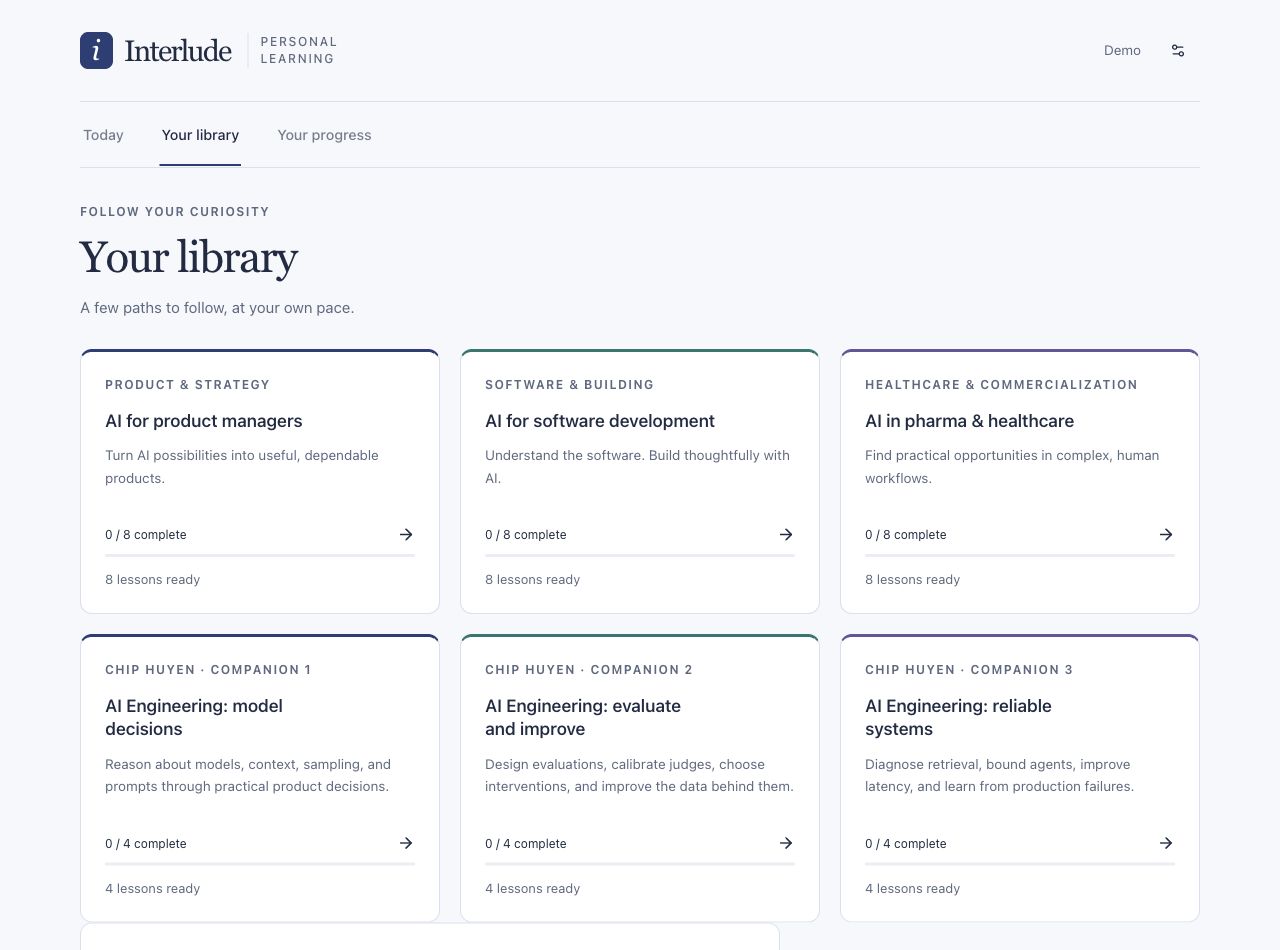
The private app now has six courses and 36 lesson texts:
- AI for product managers, AI for software development, and AI in pharma and healthcare: eight lessons each.
- AI Engineering: model decisions, evaluate and improve, and reliable systems: four lessons each, with original diagrams and optional practice.
The newer courses explore concepts from Chip Huyen’s AI Engineering through original teaching grounded in cited primary sources. Diagram descriptions also appear in the narration scripts. They do not reproduce the book. These lessons are available to read; their audio is pending recovery of an earlier interrupted narration request.
How it works
- Prepare and review teaching
Cited lesson content is reviewed and released as an explicit version.
- Save content and narration
D1 records lessons and learning state; private R2 storage holds generated narration.
- Read, listen, and return
The authenticated PWA saves progress, notes, and practice against the lesson version used.
Replaying saved audio does not generate it again.
- ExperienceReact · TypeScript · vinext/Vite · Tailwind
- One reader and persistent player across phone and laptop.
- State and storageCloudflare Workers · D1 · R2 · Drizzle
- Keep private progress, lesson history, and saved audio durable.
- Assistance and narrationCodex · OpenAI APIs · Google Chirp 3 HD
- Prepare content through my Codex task; keep optional runtime AI and reusable narration separate.
Decisions and design lessons
Make the next step obvious. Personal use led to a home screen that resumes my current lesson, a 1.5× audio default, and a footer player that opens the lesson without losing playback.
Teach directly. Repeated spoken source introductions got in the way. New lessons explain the idea first and keep routine attribution in the reading view.
Preserve work when something fails. Interrupted audio generation needs saved-output recovery and honest cost accounting. A new lesson version should also preserve earlier notes, progress, and audio.
Current state and next step
The running-cost target is under $10 a month. The next question is whether regular use helps me remember and apply more, not just finish lessons. I haven’t measured that yet. The public source and build notes document the implementation and experiments.